
Back to: PIXIE Certified Installers Training Course
Hints and Tips
PIXIE’s Bluetooth Mesh Rules of Thumb to Follow for Trouble Free Installations.
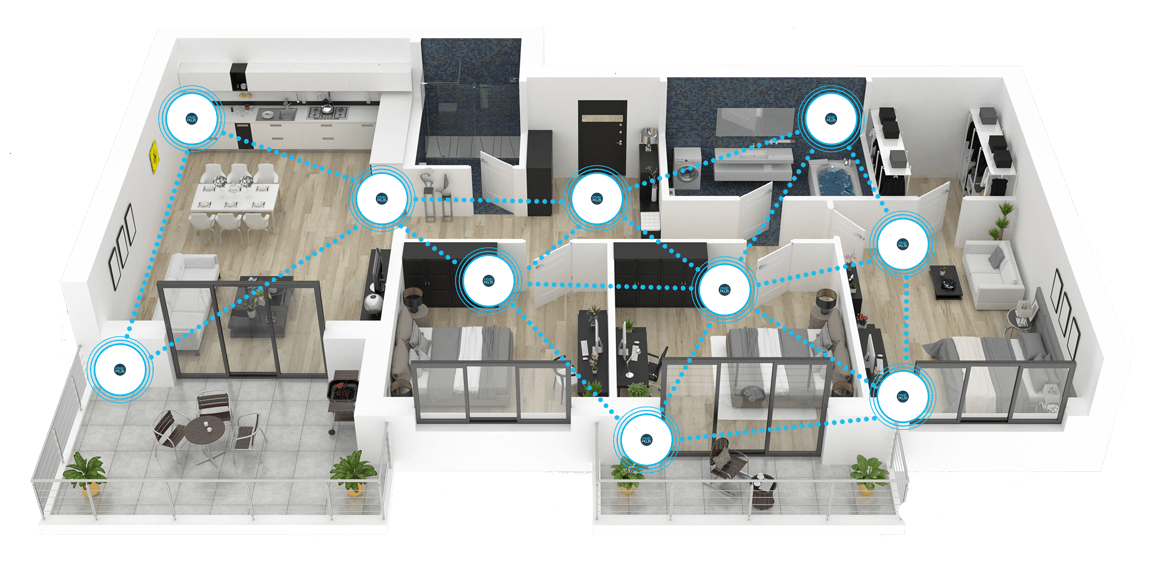
- When installing PIXIE modules into a timber, lightweight building materials and brick veneer home, up to 15 metres between devices, depending on other obstacles, walls etc.
- When installing in double brick and / or concrete constructions PIXIE signal will penetrate 1 concrete wall – with a reduced range.
The more PIXIE devices installed in a home the better the system will operate due to the MESH-ing actions of each PIXIE device added to the BT mesh network.
FAQs
All FAQ’s open a seperate link to the original FAQ on the PIXIE Partners website.
Important Documents & Links
All documents will open a seperate window and are linked to the original source document on the PIXIE Partners website.
- Download Installation and Operational Requirements Specification
- Download PIXIE Troubleshooting Guide
Transcript
Open the toggle below to view entire transcript of the lesson video. If no content is found then the transcript is still being processed, check back another time.
Video Lesson Transcript
Now obviously, on the table here, we’re going through this step-by-step and very slowly, but in reality, this happens in microseconds. So the human eye finds it very difficult to understand the difference between when I press it and when the light turns on. You don’t really notice the difference. So that’s Bluetooth mesh technology.
When we’re talking about any radio signal, it’s important to understand that, of course it’s radio and therefore there’s some limitations in what it can do. So with PIXIE, we say that when it’s installed inside a brick veneer home, inside gyprock, you’ll get about 15 meters between those devices. So as long as each of those devices are within 15 meters of each other, they’ll typically communicate and talk to each other. So it stands to reason, you can probably see the more PIXIE devices you have in the home, the better Bluetooth mesh environment you’re creating for your home to communicate reliably.
However, it is important that we talk about double brick and concrete [inaudible 00:01:47] and what in that environment is. We recommend that you get one concrete wall between connections. So for example, if I have three bedrooms that are right next to each other, and I have PIXIE devices in each of those. Likely that all of those devices are going to communicate to each other and be successfully retransmitting their signals. However, if I were to take those devices out in the middle there, and I’ve got one brick wall here and another brick wall here, it’s entirely likely that those devices over time may struggle to communicate reliably. Of course, we’ll talk about some of the solutions and ways you can get around that, but it’s important to understand that general rule of thumb when you’re designing your own homes with the PIXIE Bluetooth mesh products.
Got Questions or Comments about this Lesson?
10 Comments
Submit a Comment
You must be logged in to post a comment.
Are there any known RMI issues that may interfere with Pixie Mesh Bluetooth comms.
Microwave Ovens. Yes! This means the Microwave are escaping the oven enclosure! Which is a whole lot more worrisome than a momentary BT mesh issue IMO.
Hi Simon, I’ve come across the same situation with progressing in the lessons, I’ve watched it four times and hit marked as clear , cleared my cache, and changed broswer and device to no avail. Is there a preferred browser I should be using? And if not, are you able to progress me to the next lesson blue tooth mesh boosters?
Hi Alex, just manually progressed you manually. Be sure to use the play button at the bottom left of the video, NOT the Youtube red video icon.
Won’t let me pass this lesson watched the video about 10 times now all the other videos let me through except this one
Hi Simon,
It wont let me mark this as complete. I am only able to watch the video by clicking the red button, the black button doesn’t work.
Are you able to manually mark it as complete for me so I can progress.
Cheers
Hey Blake, thanks for sticking with us… we’ve manually progressed you – Unfortunately what was a great system for years has deteriorated and we cannot replicate the issue at our end in any way on any device! Even the developers cant help – so we a migrating to a new solution – will be too late for you so stick with this and let us know if you have any more issues
Can you please progress me as i seem to be stuck on this level. Thanks
Hello, I need to be manually progressed as I can’t proceed past this lesson. Thank you
Hi Simon, im having the same issue with trying to progress. I have seen the videos for Bluetooth mesh, bluetooth mesh explained and also for the smart dimmer introduction. Neither of them will let me mark them off a complete.