
Back to: PIXIE Certified Installers Training Course
Hints and Tips
IMPORTANT: The PIXIE Smart Dimmer is a TRAILING EDGE dimmer, which does NOT support iron-core ballasts.
If undertaking a retrofit with the PIXIE Smart Dimmer, note that you must check to ensure there are no iron ballasts on the circuit.
In the past, electricians have used iron-core ballasts as a way to smooth out dimming issues with certain dimmer and tungsten/halogen lights.
So, even if you have not installed it yourself, it may still be there from a previous install, if you are upgrading to LED and PIXIE dimmers.
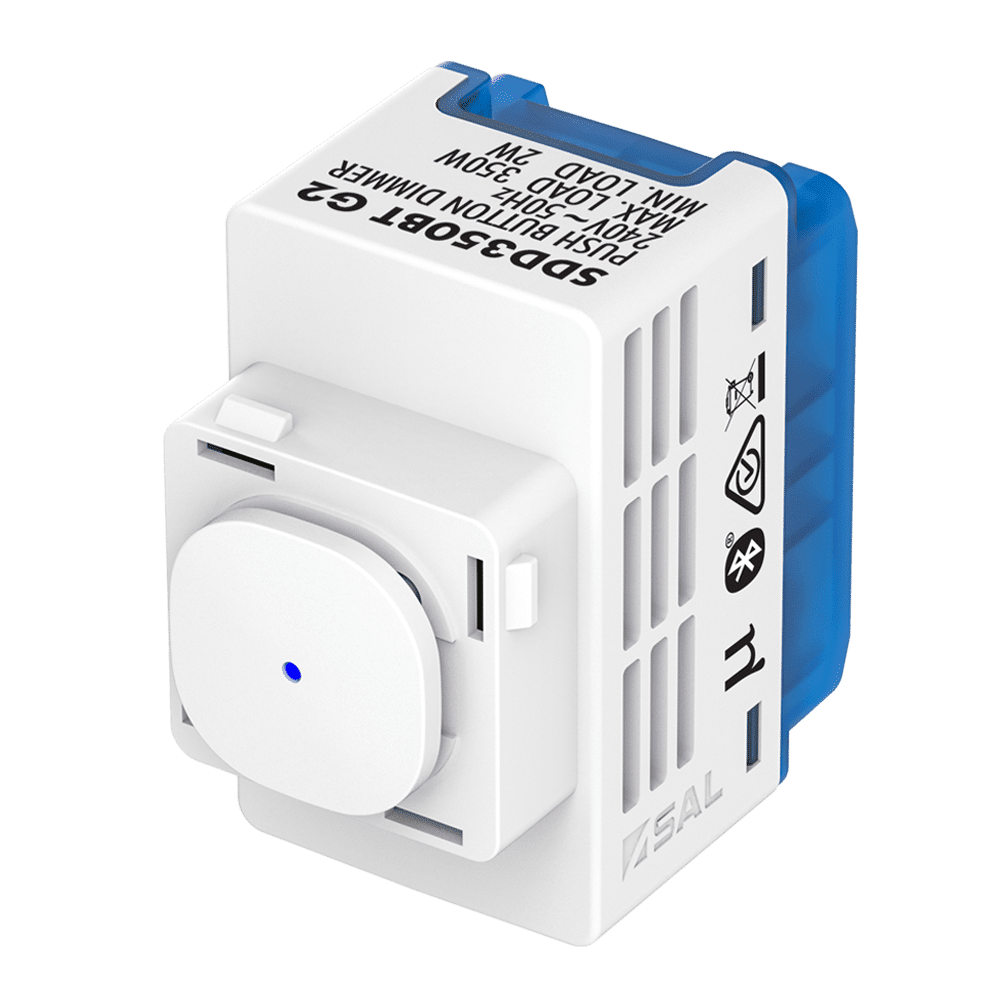
- Used for dimming LED lighting, tungsten & halogen.
- Not suitable for iron core ballasts/transformers 200VA Max load for LED dimming control.
- Comes with on/off/ press to dim, soft-start (2 second ramp-up/fade-down);
- Memory mode (return to last level), Set minimum dim mode.
- Comes with Bluetooth mesh technology, 24hour/7 Day scheduling, Groups, Scene Control
FAQs
All FAQ’s open a seperate link to the original FAQ on the PIXIE Partners website.
- Can I turn off the dimming function on the *Pixie Smart Dimmer* and convert the device to a switch to control a non-dimmable load? ♥
- Can I use PIXIE switches and dimmers without Bluetooth control? ♥
- Do PIXIE switches only work with SAL downlights? ♥
- Will SAL PIXIE devices operate with a magnetic or leading edge load? ♥
- How to do 2 way and 3 way control with PIXIE ♠
Important Documents & Links
All documents will open a seperate window and are linked to the original source document on the PIXIE Partners website.
Documents
Links
Transcript
Open the toggle below to view entire transcript of the lesson video. If no content is found then the transcript is still being processed, check back another time.
Video Lesson Transcript
SIMON:
Today we’re going to talk about the PIXIE Smart dimmer. The PIXIE Smart dimmer is a module as you can see right here. It’s a 350 watt trailing edge dimmer with a two watt minimum load. So perfect for a new build or retrofit, but a word of warning if you’re using it for retrofit applications, because it is a trailing edge dimmer quite often in older homes, you may find some iron core ballasts or iron core transformers installed on downlights.
SIMON:
Quite often they would have been put in place by a previous electrician to try and stop flickering on that dimming halogen light. If there’s an iron core transformer in place that the PIXIE dimmer will not like it and likely you’re going to damage the dimmer. So if you’re doing a retrofit with the PIXIE dimmer, please check to make sure that there is no iron core transformer in place.
SIMON:
The PIXIE dimmer itself, as you can see fits into a range of wall plates as we discussed previously. You can probably notice by the size of it, that it’s very obvious that you won’t be able to do any more than a three gang wall plate at this stage.
SIMON:
This particular dimmer is our generation two dimmer, or you may be familiar with an older version, which is a generation one. Later in 2021, we’re also having a new generation three dimmer, which will be a smaller form factor dimmer.
Got Questions or Comments about this Lesson?
23 Comments
Submit a Comment
You must be logged in to post a comment.
The video will not play
Refresh your page Liam.
If that doesn’t work go to the bottom
Of the page and go back to
The previous lesson – then come back here.
Let us know how you go.
Video will not work
Seems a number of people are having issues with this particular video. Best bet is to refresh the page and let it reload or go back to the previous lesson – then come back here again.
Its random who is impacted, apologies, but please refresh or navigate back and forward again.
Hayden, you should be able to move on now.
Please help. I cannot get passed this session.
G’day Simon, I’m having a lot of issues moving through these tutorials. I keep trying all of the previous suggested solutions however, after watching most of the videos the page doesn’t seem to recognize this and clicking ‘mark complete’ or ‘continue’ doesn’t allow the next tutorial to be accessible.
I know you’ve stated previously that it seems it’s on our end but I can’t figure it out
Can watch the video but won’t let me pass on to the next video
Hi I am also having trouble moving on to the next lesson, I have seen the video many times now, but by pressing the red play button in the middle of the screen. The white play button on the bottom left doesn’t work
Hi Craig try again now please
hey ive tried multiple times to mark complete refereshed the page also went on a another computer rewatched it and still will not mark complete
Please try again now. HARD refresh your browser f5. If you are using a phone, disable wifi, refresh the page – it will not load. Then re-enable wifi and refresh again – this will clear your cache on the phone. If on PC / MAC try different browser like firefox please.
Im having issues with this video too sorry. I did notice that the others showed the normal youtube persona – play button and scroll bar with watermark on the right, but this one that im having issues with shows you youtube watermark but a different persona, a black scroll tab that doesnt fill as the video play
We have chosen to auto-complete all lesson for you so you do not have any further issues in future lessons. Apologies for the inconvenience.
Can’t get through the training as it won’t load to next section. Seems like other people having same issue
We have chosen to auto-complete all lesson for you so you do not have any further issues in future lessons. Apologies for the inconvenience.
Hi I am having the same issues as the rest! watched multiple times also logged in and out multiple times. Still won’t let me proceed.
We have chosen to auto-complete all lesson for you so you do not have any further issues in future lessons. Apologies for the inconvenience.
Thanks Simon looking forward to get installing!
Perfect product
Unreal product
Unable to progress to next lesson
Hi is there video’s or course content for the following?
Dimmer Basic Operations
The lesson “Dimmer Basic Operations” cannot be accessed until the required prerequisite “PIXIE Fits In – Click Clack Snap” is completed.
Dimmer Button Presses
The lesson “Dimmer Button Presses” cannot be accessed until the required prerequisite “PIXIE Fits In – Click Clack Snap” is completed.
The Dimmer and The CAPACITOR
The lesson “The Dimmer and The CAPACITOR” cannot be accessed until the required prerequisite “PIXIE Fits In – Click Clack Snap” is completed.
PIXIE Smart Dimmer G3 SDD300BTAM
Yes as you complete or mark complete the previosu lesson s that is made available.